
There’s a coaching service at UBC where staff and faculty are able to search through a data base of coaches and receive free coaching sessions.
In 2022, a new coaching portal was launched. Shortly after the launch, the coaching portal team requested help in two areas:
• ensure that the experience was optimized for clients
• ensure alignment with the HR.UBC.CA website as a whole
Extensive research was completed (competitive audit, user research, user testing, etc.)
User Research
- Usability testing with 4 new users and 2 experienced users
- Card sort activity with 11 people
Findings
- Technical issues uncovered
- Confusion around internal or external coaches
- Confusion around instructions around documents
- Confusion around filtering experience as the default option showed no coaches
- Emails are currently underused
Recommendations & Results
Portal Dashboard
Initially, there was extensive text introducing the portal. Users did not need this and skipped through this during user testing. Instead, users were looking to complete their tasks.
My recommendation was to remove unnecessary text and increase the visibility of the two main calls to action: find your coach and find coaching resources.
See below for a mockup.

Coaching Resource Library
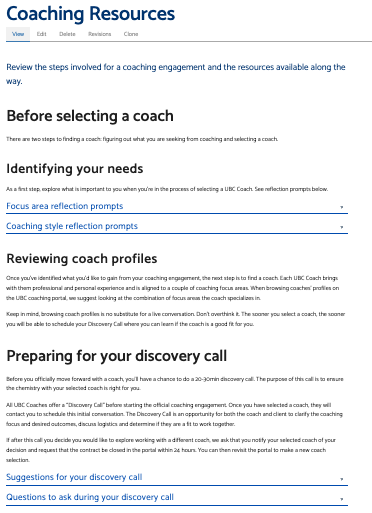
Initially, the coaching resource library was a mixture of technical troubleshooting documents and videos and some policy information. User testing showed that the technical use of the portal was very straightforward, and such extensive user documentation for the portal was not required.
I was able to work with the Coaching team to re-write the content to follow the user journey of someone who was going through the coaching process. See below for an example of the page structure.
Email Triggers
When users were emailed through the coaching portal, the emails were focused on notifying the user when something was complete. For example, an email would be sent to the user when a coach has confirmed they will be the user’s coach. However, there was no call to action. The email was used to inform only.
Through working with the Coaching team, the email notification system has been further developed to align with the user’s needs depending on where they are in their user journey. Depending on the stage of coaching a user is in, they will receive an email (triggered by the Coaching Portal process) directing them to specific areas of the Coaching Resource page and with relevant tips needed depending on the stage of their journey. See below for examples of the flow.
- User creates a profile and receives email about finding your focus area and coach
- User request meeting with a coach and receives email about how to prepare for a discovery session
- User receives notification of the coach confirmation and the user is emailed with information on how to prepare for coaching sessions
Find a Coach
The find a coach page was an area users struggled with due to overcomplexity of the form. See below for the current state:
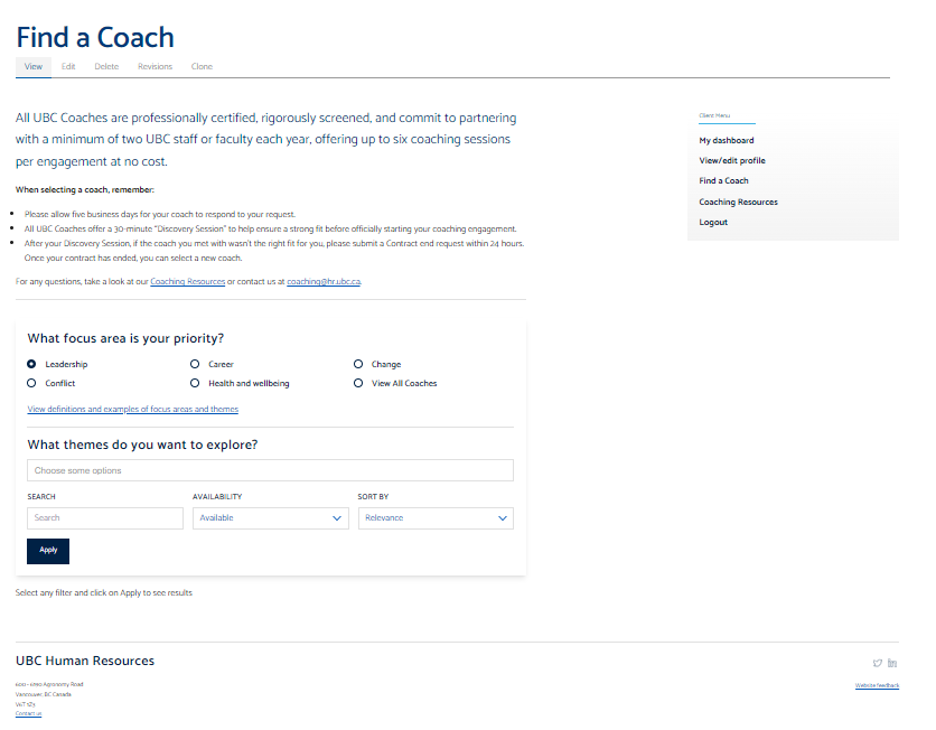
Some struggles that were identified were:
- The coaches were not displayed immediately and users could filter too ‘deep’ and not see coaches – making it look like there were no coaches available
- The focus area priorities and themes were overly complicated
Through card sorting, we were able to reduce the focus areas and themes to be 5 key areas instead of 10 to reduce confusion. Working with IT, we will be able to have all coaches visible immediately when the user arrives to the page and they will be able to filter down from there.
 Natalie Pope